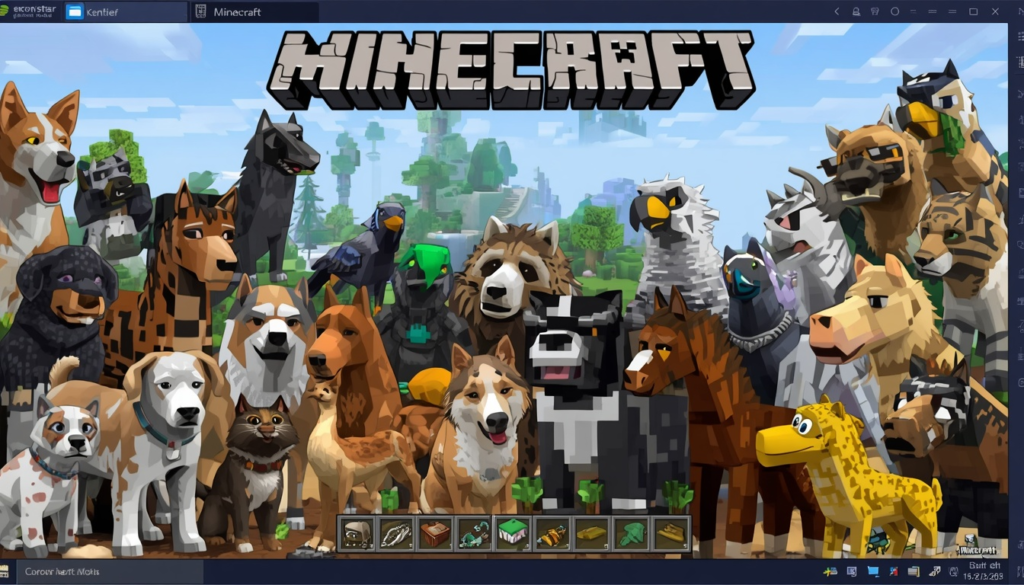
Minecraft is one of the most popular video games in the world. Millions of players log in every single day to break blocks, build massive castles, and explore endless digital worlds. If you are playing Minecraft for PC, you have access to the absolute best version of the game. The computer version allows you to change how the game looks, acts, and feels.
One of the most exciting ways to change your game is by using animal mods for minecraft pc. These modifications, or “mods” for short, add brand-new creatures to your world. You can add everything from tiny birds to massive elephants. This comprehensive guide will teach you everything you need to know about the PC version of the game and how to make it wilder with amazing creatures.
Why Minecraft for PC is the Best Way to Play
When you play this blocky game on a computer, you are unlocking its full potential. Consoles and phones are great, but computers offer the ultimate gaming experience. You can use a mouse and keyboard for perfect aiming and building. Computers also have more power to handle large worlds and complex graphics.
The biggest advantage of the computer version is freedom. You can easily download custom maps, join massive multiplayer servers, and install unique texture packs. Most importantly, it is the best platform for changing the game’s code. The PC gaming community has spent over a decade creating free add-ons that can turn your basic game into a completely new adventure.
Understanding the Different PC Versions
Before you start downloading extra content, you need to know which version of the game you own. There are two main versions on the computer. They look similar, but they work differently under the hood.
The Java Edition
This is the original version of the game. It was built specifically for computers. If you want to use heavy modifications, Java Edition is the version you need. It has the largest community of creators. Almost every famous creature mod you see online was made for this specific version.
The Bedrock Edition
This version is also called Minecraft for Windows. It is designed to let you play with friends who are on Xbox, PlayStation, or mobile phones. This is called cross-platform play. While it runs very smoothly, it does not support traditional, free community mods as easily as the original version does. Instead, it uses add-ons from an official marketplace.
What are Animal Mods and Why Do You Need Them?
The standard version of the game already has some animals. You can find cows, sheep, pigs, and chickens wandering around the fields. These are called passive mobs because they do not attack you. While they are useful for gathering food and wool, the variety can feel a bit small after a while.
That is where extra creature packs come into play. These player-made files add real-world beasts, mythical creatures, and extinct dinosaurs to your biomes. They make the world feel alive. Instead of looking at the same three pigs in a forest, you might see deer running through the trees or frogs hopping by a swamp. It turns your game into a living, breathing safari.
How to Prepare Your Computer for Modifications
You cannot just download a mod and expect it to work instantly. You need a little bit of help from a helper program. Think of it like installing an engine inside a car body.
Installing Forge or Fabric
To run these creature files, you need a mod loader. The two most famous ones are Forge and Fabric. They act like a bridge between the game and your new files. You simply download one of these loaders, run the installer, and it creates a special folder on your computer.
The Magic Mods Folder
Once your loader is ready, you will find a folder named “mods” inside your game directory. To add new wildlife to your world, you just drop the downloaded files directly into this folder. It is that simple. When you launch the Minecraft launcher, make sure to select the Forge or Fabric profile before hitting the play button.
The Best Animal Mods for Minecraft PC
There are hundreds of options available online. Some add just a few realistic pets, while others completely overhaul the entire ecosystem. Here are the top choices that every player should try.
1. Alex’s Mobs
This is arguably the most famous option available today. It adds over 80 new creatures to the game. Every single creature has a specific purpose and unique behavior.
- Grizzly Bears: You can find them in pine forests. They love eating honey and will protect their cubs.
- Capybaras: These are super friendly, giant rodents. You can attach chests to them to help carry your items.
- Orcas: These massive whales swim in cold oceans. They hunt in packs and put on amazing jumping shows.
2. Better Animals Plus
If you want your game to look a bit more realistic and spooky, this is the choice for you. It adds a mix of friendly forest creatures and dangerous predators.
- Deer and Elk: They leap beautifully through plains and forests, giving the environment a peaceful vibe.
- Brown Bears and Wolves: These predators will hunt you down if you get too close, making nighttime survival much harder.
- Sharks: Swimming in the ocean becomes a real challenge because these beasts patrol the deep water.
3. Naturalist
This option focuses heavily on creating a natural food chain. The creatures interact with each other just like they do in the real world.
- Forest Biomes: You will see squirrels collecting nuts, birds singing in trees, and caterpillars turning into butterflies.
- Savannah Biomes: Lions will actively hunt zebras, while giraffes eat leaves from tall trees.
Exploring New Biomes and Environments
When you add these wildlife packages, exploring your world becomes a brand-new adventure. Every biome (which is just a fancy word for a climate zone like a desert or forest) gets its own unique residents.
When you walk into a desert, you won’t just see sand anymore. You might encounter rattling snakes, scorpions hiding under rocks, or camels waiting for a rider. If you travel to the frozen tundras, you will spot penguins sliding on the ice and polar bears hunting for fish. This gives you a massive reason to travel far away from your home base. You will want to see what kind of wildlife lives in every corner of your seed.
How Wildlife Changes Survival Mode
Adding new beasts changes how you play survival mode completely. It makes the game both easier and harder at the same time.
On the positive side, you get brand-new sources of food and materials. Some creatures drop special pelts that you can use to craft warm clothing. Others might drop rare items that help you brew magical potions. On the negative side, the world becomes much more hazardous. Walking through a jungle at night is terrifying when there are tigers hiding in the bushes. You have to be much more careful and build stronger defenses around your house.
Taming and Breeding Your New Companions
One of the best parts of playing with these packages is making new friends. Many of these creatures can be tamed just like the standard wolves and cats in the base game.
To tame a wild beast, you usually need to offer it its favorite food. For example, you might need to feed a wild bird some seeds or give a crocodile some fresh meat. Once tamed, these creatures will follow you around. Some will fight by your side against zombies and skeletons. Others can be bred together using food to create cute baby versions, allowing you to build your very own zoo or wildlife sanctuary.
Optimizing Computer Performance
Adding lots of new models and artificial intelligence to your game can make your computer work extra hard. If you notice your game is stuttering or lagging, you need to make a few adjustments to your PC settings.
First, you can lower your render distance. This controls how far away you can see blocks loading. Lowering it gives your computer’s graphics card a break. Second, you can install optimization tools like OptiFine or Sodium. These are special performance packages that rewrite parts of the game’s code to make it run smoother. They can easily double your frame rate, ensuring your new wildlife moves around with buttery-smooth animations.
Where to Safely Download Content
You must be very careful when downloading files from the internet. Some bad websites try to put viruses on your computer. Always use trusted community websites.
The safest place to get these packages is CurseForge or Modrinth. These websites are official platforms where creators share their work safely. They scan every single file for malware before letting anyone download it. Never download files from strange websites that ask you to click on multiple pop-up ads. Stick to the trusted platforms to keep your computer healthy.
Summary: Crafting Your Perfect World
Playing Minecraft for PC offers an unmatched level of creativity and fun. By installing animal mods for minecraft pc, you can transform a simple blocky landscape into an epic wildlife adventure. Whether you want to swim with gentle sea turtles, hunt dangerous wolves in the snow, or build a massive ranch filled with exotic birds, the choice is entirely yours. Get your mod loader ready, download your favorite creature packs safely, and start building your ultimate wild world today!